mirror of
https://github.com/chillout2k/ExOTA-Milter.git
synced 2025-12-12 18:00:19 +00:00

149 lines
11 KiB
Markdown
149 lines
11 KiB
Markdown

|
||

|
||
|
||
|
||
# ExOTA-Milter - Exchange Online Tenant Authorisation Milter (Mail-Filter)
|
||
|
||

|
||
|
||
*Diagram created with: https://app.diagrams.net/*
|
||
|
||
The **ExOTA-[Milter](https://en.wikipedia.org/wiki/Milter)** application is written in python3 and derives from **[sdgathman´s pymilter](https://github.com/sdgathman/pymilter)**.
|
||
|
||
# Abstract/problem/motivation
|
||
Fact is that more and more companies are migrating their Outlook/Exchange environments to the [Microsoft cloud](https://www.microsoft.com/microsoft-365).
|
||
|
||
The **ExOTA-Milter** is kind of an authentication helper which plays an essential as well as security-related role in the so called [*smarthost connector for Microsoft Exchange-Online*](https://docs.microsoft.com/de-de/exchange/mail-flow-best-practices/use-connectors-to-configure-mail-flow/set-up-connectors-to-route-mail) scenario. The milter tries to close the gap of missing [client SMTP-Auth capability](https://tools.ietf.org/html/rfc4954) of MS Exchange-Online when there´s a need to relay emails over a third party smarthost. According to this the MS Exchange-Online platform expects the smarthost to accept emails without any further authentication of users/tenants, which can lead to many misconfigured SMTP-relays!
|
||
|
||
So, the question is: *How can an Exchange-Online user/tenant be identified by a smarthost?*
|
||
|
||
# Tenant identification options provided by Microsoft
|
||
## Client-IP ranges specified by Microsoft
|
||
Microsoft provides an ACL as [JSON file (ID: 10)](https://endpoints.office.com/endpoints/worldwide?clientrequestid=b10c5ed1-bad1-445f-b386-b919946339a7), which looks like this.
|
||
```
|
||
[...]
|
||
{
|
||
"id": 10,
|
||
"serviceArea": "Exchange",
|
||
"serviceAreaDisplayName": "Exchange Online",
|
||
"urls": [
|
||
"*.mail.protection.outlook.com"
|
||
],
|
||
"ips": [
|
||
"40.92.0.0/15",
|
||
"40.107.0.0/16",
|
||
"52.100.0.0/14",
|
||
"104.47.0.0/17",
|
||
"2a01:111:f400::/48",
|
||
"2a01:111:f403::/48"
|
||
],
|
||
"tcpPorts": "25",
|
||
"expressRoute": true,
|
||
"category": "Allow",
|
||
"required": true
|
||
}
|
||
[...]
|
||
```
|
||
|
||
The problem of IP based ACLs is that many other Exchange-Online customers/tenants are sending from the same IP-ranges as well! **This means that many smarthost configured to relay mails comming from Exchange-Online tend to act as open relays (for Microsoft customers) unless additional authentication mechanism on a higher layer than IP takes place! IP-address based ACLs are definitely not the right way to achieve this!**
|
||
|
||
## x509 client certificate presented by Exchange-Online
|
||
The Exchange-Online platform also *presents* a x509 client certificate to identitfy onself to the smarthost. Taking a closer look at the received header shows on that the certificates common name (CN) *mail.protection.outlook.com* is not realy tenant specific. Although the certificate provides additional security regarding the identity of the client system, it does not provide identity regarding the tenant. **IMHO that´s stil not enough to permit relaying!**
|
||
```
|
||
Received: from DEU01-FR2-obe.outbound.protection.outlook.com (mail-fr2deu01lp2173.outbound.protection.outlook.com [104.47.11.173])
|
||
(using TLSv1.2 with cipher ECDHE-ECDSA-AES256-GCM-SHA384 (256/256 bits))
|
||
(Client CN "mail.protection.outlook.com", Issuer "GlobalSign Organization Validation CA - SHA256 - G3" (verified OK))
|
||
by some.secure.smarthost.example.com (Postfix) with ESMTPS id 4CjqCQ2WRCzGjg6
|
||
for <blah.blubb@example.com>; Sat, 28 Nov 2020 12:34:26 +0100 (CET)
|
||
```
|
||
Client certificate verification is the job of the underlying MTA. So the **ExOTA-Milter** does not validate the client certificate itself, but it can be enabled (disabled per default) to match for the *expected* client CN. The mail server software [Postfix](http://postfix.org), for example, only presents the client CN to the milter API if the client certificate was successfully validated before. Otherwise the **ExOTA-Milter** will not *see* the client CN over the milter protocol ([postfix milter macro](http://www.postfix.org/MILTER_README.html#macros) `{cert_subject}`) which results in a milter reject action.
|
||
|
||
## DKIM - DomainKey Identified Message
|
||
Nevertheless, as [Microsoft supports DKIM-signing for outbound email traffic](https://docs.microsoft.com/de-de/microsoft-365/security/office-365-security/use-dkim-to-validate-outbound-email?view=o365-worldwide) the **ExOTA-Milter** can be used to authenticate sending tenants, respectively their sender domains, based on the cryptographic capabilities of [DKIM](https://tools.ietf.org/html/rfc6376). In fact the **ExOTA-Milter** does not validate the DKIM-signatures itself. Instead it simply parses DKIM-specific *Authentication-Results* headers produced by any previously DKIM-validating milter (like [OpenDKIM](http://www.opendkim.org/), [Rspamd](https://rspamd.com/) or [AMavis](https://www.ijs.si/software/amavisd/)) in the chain. I personally prefer OpenDKIM as it´s lightweight and fully focused on DKIM.
|
||
|
||
**To use DKIM for tenant/sender domain authentication, DKIM must be enabled in the milter as well as in each policy!**
|
||
|
||
**Worth to know when using OpenDKIM as AR provider:** As Microsoft already signs with 2kRSA keys be sure to use a version of OpenDKIM, which is linked against a DNS resolver library that is able to handle such large DNS responses! Further the resolver library should be aware of DNSSEC! **[libunbound](https://nlnetlabs.nl/documentation/unbound/libunbound/) meets all of these requirements :-)**. A libunbound-linked version of OpenDKIM is provided by [Debian](https://wiki.debian.org/opendkim#DNS_resolution).
|
||
|
||
*DKIM-Signature* headers appended by the Exchange-Online platform look like this:
|
||
```
|
||
[...]
|
||
DKIM-Signature: v=1; a=rsa-sha256; c=relaxed/relaxed;
|
||
d=tenantdomain.onmicrosoft.com; s=selector1-tenantdomain-onmicrosoft-com;
|
||
h=From:Date:Subject:Message-ID:Content-Type:MIME-Version:X-MS-Exchange-SenderADCheck;
|
||
bh=KWHUKEKZxeQyFbKe45TV1PJMC2XrVCMTFkdwSYWR6o0=;
|
||
b=DYTLJtLFjvVrSZtZQagTwuEe5PQYqrNGi7hR5bkhO[...snip...]
|
||
[...]
|
||
```
|
||
*Authentication-Results* headers provided by OpenDKIM (signature valid, public key not DNSSEC signed) look like this:
|
||
```
|
||
[...]
|
||
Authentication-Results: trusted.dkim.validating.relay;
|
||
dkim=pass (2048-bit key; unprotected) header.d=tenantdomain.onmicrosoft.com header.i=@tenantdomain.onmicrosoft.com header.b=mmmjFpv8";
|
||
dkim-atps=neutral
|
||
[...]
|
||
```
|
||
|
||
## More authentic message forwarding with DKIM alignment
|
||
|
||
From the point of view of a postmaster, message forwarding is a kind of nightmare. If DKIM alignment requirement is enabled (`ENV[MILTER_DKIM_ALIGNMENT_REQUIRED]`) the DKIM SDID (Signers Domain ID = `header.d` field of *Authentication-Results* header) must be equivalent to the RFC5322.from_domain. In this mode the **ExOTA-Milter** operates in the most secure way, but with limitations in terms of usability. With DKIM alignment enabled [traditional email forwarding](https://docs.microsoft.com/de-de/microsoft-365/admin/email/configure-email-forwarding?view=o365-worldwide) cannot be guaranteed to work. In this case the exchange online system preserves the original RFC5322.from header (e.g. *someone@gmail.com*) and signs the forwarded message with the main tenants SDID, e.g. *tenantdomain.onmicrosoft.com*. An email that was forwarded in that way cannot pass the DKIM alignment, because the RFC5322.from_domain (e.g. *gmail.com*) will never match the DKIM SDID (e.g. *tenantdomain.onmicrosoft.com*). Further there is no policy match for the RFC5322.from_domain!
|
||
|
||
Nevertheless, don´t put your head in the sand, there is a way out of this dilemma! Just use **outlook rules** instead of the classic forwarding feature to forward messages, which is described [here](https://support.microsoft.com/en-us/office/use-rules-to-automatically-forward-messages-45aa9664-4911-4f96-9663-ece42816d746). In this case the original content gets forwarded within a new message, that carries the correct RFC5322.from as well as the correct DKIM SDID! Messages forwarded in such way will always pass DKIM alignment -> mission accomplished! Don´t forget to tell your end users how to correctly set up their forwarding in outlook ;)
|
||
|
||
By the way, the global setting `ENV[MILTER_DKIM_ALIGNMENT_REQUIRED]` can be overriden per policy! Just add the following `dkim_alignment_required` key with the value `false` to the appropriate policy:
|
||
```
|
||
"yad.onmicrosoft.com": {
|
||
"tenant_id": "1234abcd-18c5-45e8-88de-123456789abc",
|
||
"dkim_enabled": true,
|
||
"dkim_alignment_required": false
|
||
}
|
||
```
|
||
|
||
## X-MS-Exchange-CrossTenant-Id header (policy binding)
|
||
Further each Microsoft Exchange-Online tenant has a unique tenant-ID in form of a UUID ([RFC 4122](https://tools.ietf.org/html/rfc4122)). **ExOTA-Milter** extracts the tenant-ID from the *X-MS-Exchange-CrossTenant-Id* email header and uses it as a *mandatory* authentication factor.
|
||
```
|
||
[...]
|
||
X-MS-Exchange-CrossTenant-Id: <UUID-of-tenant>
|
||
[...]
|
||
```
|
||
At last the **ExOTA-Milter** needs an additional policy (currently as JSON file or LDAP server), that provides a mapping of *sender-domain <-> tenant-id* and if DKIM-signatures must be taken under consideration or not. The JSON policy file itself looks like this:
|
||
```
|
||
{
|
||
"yad.onmicrosoft.com": {
|
||
"tenant_id": "1234abcd-18c5-45e8-88de-123456789abc",
|
||
"dkim_enabled": true,
|
||
"dkim_alignment_required": true
|
||
}
|
||
}
|
||
```
|
||
# The solution
|
||
So, *how can an Exchange-Online user/tenant be identified by a third party smarthost?*
|
||
|
||
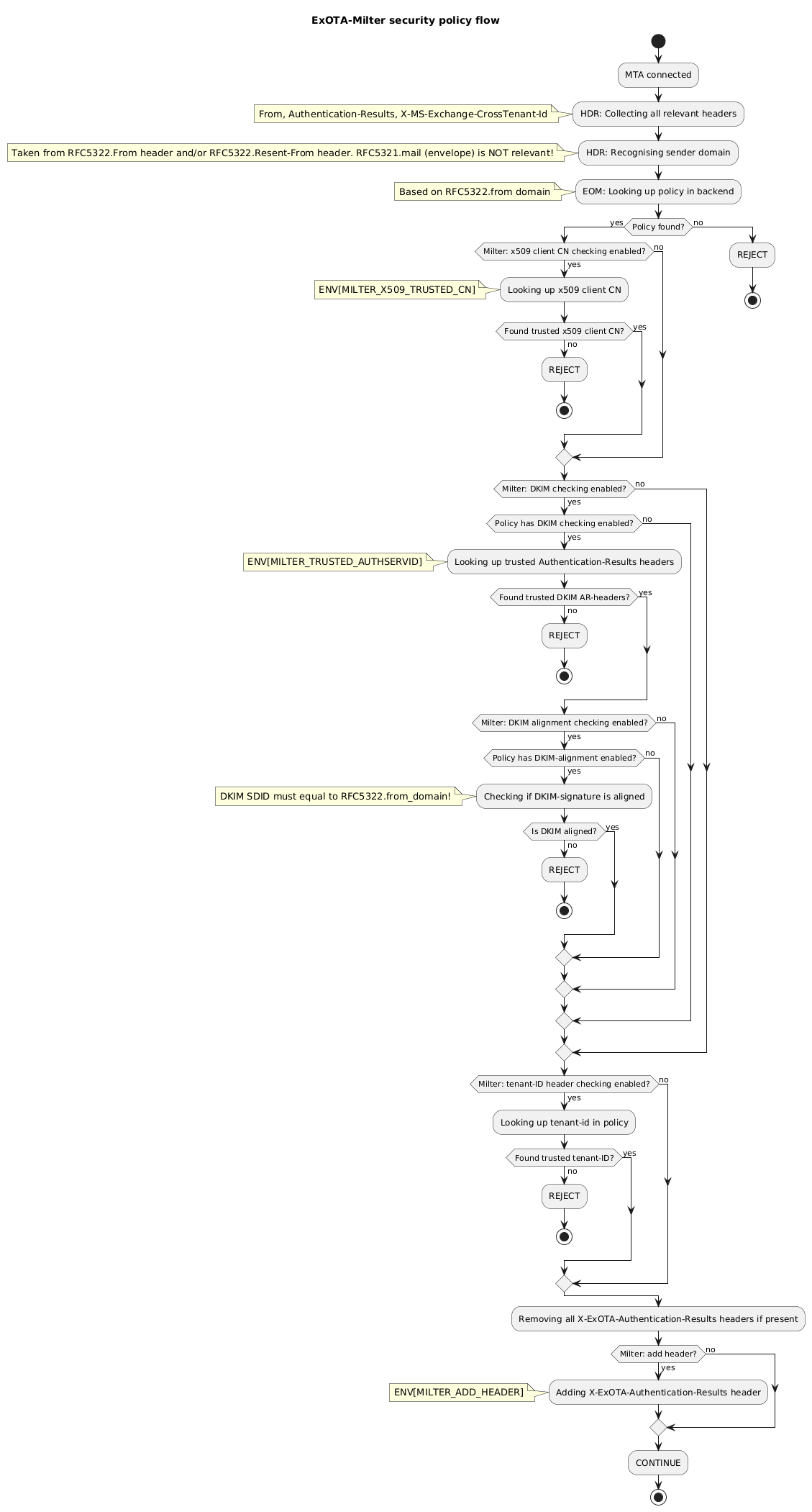
Finally it´s the combination of all of the above discussed aspects which may result in a robust-enough smarthost setup used by the Exchange-Online platform:
|
||
* restriction of client IPs via ACL (MTA)
|
||
* verification of Microsoft´s x509 client certificate (MTA)
|
||
* matching for client certificate´s CN (ExOTA-Milter)
|
||
* verification of DKIM signatures providing *Authentication-Results* header (another milter, e.g. OpenDKIM)
|
||
* consideration of DKIM verification results per sender domain (ExOTA-Milter)
|
||
* matching for tenant-id provided in *X-MS-Exchange-CrossTenant-Id* header (ExOTA-Milter)
|
||
|
||
|
||
|
||
# How about using LDAP as policy backend?
|
||
For small setups, with not so many domains, the JSON-file policy backend (default) may be sufficient. If you´re an email service provider (ESP) maintaining a lot of customer domains in a LDAP server, you may want to use the LDAP backend instead. Details regarding the LDAP backend can be found [in the LDAP readme](LDAP/README.md).
|
||
|
||
# How about a docker/OCI image?
|
||
## Using prebuilt images from [dockerhub](https://hub.docker.com/)
|
||
* AMD64: https://hub.docker.com/r/chillout2k/exota-milter-amd64
|
||
* ARM32v6: https://hub.docker.com/r/chillout2k/exota-milter-arm32v6
|
||
|
||
The images are built on a weekly basis. The corresponding *Dockerfile* is located [here](OCI/Dockerfile)
|
||
|
||
## Build your own image
|
||
Take a look [here](OCI/README.md)
|
||
|
||
# How to test?
|
||
First of all please take a look at how to set up the testing environment, which is described [here](tests/README.md)
|
||
|
||
# How to install on docker/kubernetes/systemd?
|
||
The installation procedure is documented [here](INSTALL/README.md) |