|
|
||
|---|---|---|
| .github/workflows | ||
| .vscode | ||
| app | ||
| INSTALL | ||
| LDAP | ||
| OCI | ||
| samples | ||
| snippets | ||
| tests | ||
| .gitignore | ||
| activity_policy.puml | ||
| LICENSE | ||
| README.md | ||
| requirements.txt | ||
| use-case.png | ||
| use-case.xml | ||


ExOTA-Milter - Exchange Online Tenant Authorisation Milter (Mail-Filter)
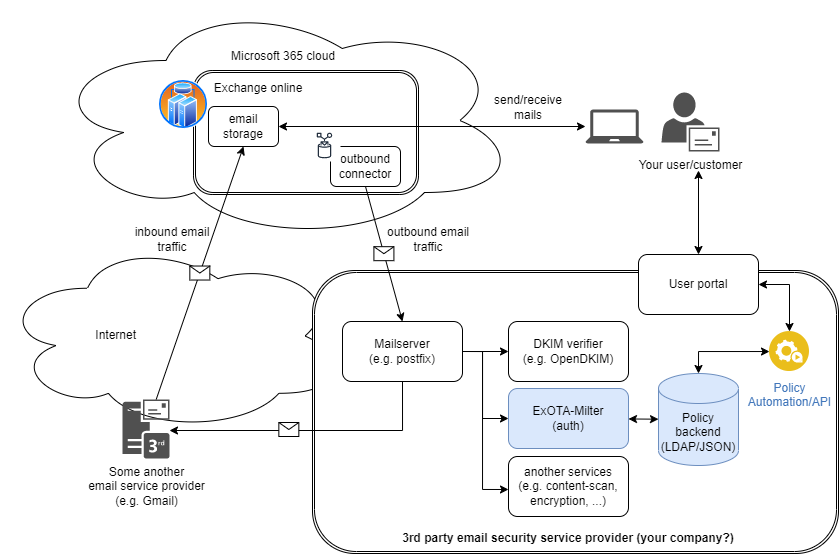
Diagram created with: https://app.diagrams.net/
The ExOTA-Milter application is written in python3 and derives from sdgathman´s pymilter.
Abstract/problem/motivation
Fact is that more and more companies are migrating their Outlook/Exchange environments to the Microsoft cloud.
The ExOTA-Milter is kind of an authentication helper which plays an essential as well as security-related role in the so called smarthost connector for Microsoft Exchange-Online scenario. The milter tries to close the gap of missing client SMTP-Auth capability of MS Exchange-Online when there´s a need to relay emails over a third party smarthost. According to this the MS Exchange-Online platform expects the smarthost to accept emails without any further authentication of users/tenants, which can lead to many misconfigured SMTP-relays!
So, the question is: How can an Exchange-Online user/tenant be identified by a smarthost?
Tenant identification options provided by Microsoft
Client-IP ranges specified by Microsoft
Microsoft provides an ACL as JSON file (ID: 10), which looks like this.
[...]
{
    "id": 10,
    "serviceArea": "Exchange",
    "serviceAreaDisplayName": "Exchange Online",
    "urls": [
      "*.mail.protection.outlook.com"
    ],
    "ips": [
      "40.92.0.0/15",
      "40.107.0.0/16",
      "52.100.0.0/14",
      "104.47.0.0/17",
      "2a01:111:f400::/48",
      "2a01:111:f403::/48"
    ],
    "tcpPorts": "25",
    "expressRoute": true,
    "category": "Allow",
    "required": true
  }
[...]
The problem of IP based ACLs is that many other Exchange-Online customers/tenants are sending from the same IP-ranges as well! This means that many smarthost configured to relay mails comming from Exchange-Online tend to act as open relays (for Microsoft customers) unless additional authentication mechanism on a higher layer than IP takes place! IP-address based ACLs are definitely not the right way to achieve this!
x509 client certificate presented by Exchange-Online
The Exchange-Online platform also presents a x509 client certificate to identitfy onself to the smarthost. Taking a closer look at the received header shows on that the certificates common name (CN) mail.protection.outlook.com is not realy tenant specific. Although the certificate provides additional security regarding the identity of the client system, it does not provide identity regarding the tenant. IMHO that´s stil not enough to permit relaying!
Received: from DEU01-FR2-obe.outbound.protection.outlook.com (mail-fr2deu01lp2173.outbound.protection.outlook.com [104.47.11.173])
	(using TLSv1.2 with cipher ECDHE-ECDSA-AES256-GCM-SHA384 (256/256 bits))
	(Client CN "mail.protection.outlook.com", Issuer "GlobalSign Organization Validation CA - SHA256 - G3" (verified OK))
	by some.secure.smarthost.example.com (Postfix) with ESMTPS id 4CjqCQ2WRCzGjg6
	for <blah.blubb@example.com>; Sat, 28 Nov 2020 12:34:26 +0100 (CET)
Client certificate verification is the job of the underlying MTA. So the ExOTA-Milter does not validate the client certificate itself, but it can be enabled (disabled per default) to match for the expected client CN. The mail server software Postfix, for example, only presents the client CN to the milter API if the client certificate was successfully validated before. Otherwise the ExOTA-Milter will not see the client CN over the milter protocol (postfix milter macro {cert_subject}) which results in a milter reject action.
DKIM - DomainKey Identified Message
Nevertheless, as Microsoft supports DKIM-signing for outbound email traffic the ExOTA-Milter can be used to authenticate sending tenants, respectively their sender domains, based on the cryptographic capabilities of DKIM. In fact the ExOTA-Milter does not validate the DKIM-signatures itself. Instead it simply parses DKIM-specific Authentication-Results headers produced by any previously DKIM-validating milter (like OpenDKIM, Rspamd or AMavis) in the chain. I personally prefer OpenDKIM as it´s lightweight and fully focused on DKIM.
To use DKIM for tenant/sender domain authentication, DKIM must be enabled in the milter as well as in each policy!
Worth to know when using OpenDKIM as AR provider: As Microsoft already signs with 2kRSA keys be sure to use a version of OpenDKIM, which is linked against a DNS resolver library that is able to handle such large DNS responses! Further the resolver library should be aware of DNSSEC! libunbound meets all of these requirements :-). A libunbound-linked version of OpenDKIM is provided by Debian.
DKIM-Signature headers appended by the Exchange-Online platform look like this:
[...]
DKIM-Signature: v=1; a=rsa-sha256; c=relaxed/relaxed;
 d=tenantdomain.onmicrosoft.com; s=selector1-tenantdomain-onmicrosoft-com;
 h=From:Date:Subject:Message-ID:Content-Type:MIME-Version:X-MS-Exchange-SenderADCheck;
 bh=KWHUKEKZxeQyFbKe45TV1PJMC2XrVCMTFkdwSYWR6o0=;
 b=DYTLJtLFjvVrSZtZQagTwuEe5PQYqrNGi7hR5bkhO[...snip...]
[...]
Authentication-Results headers provided by OpenDKIM (signature valid, public key not DNSSEC signed) look like this:
[...]
Authentication-Results: trusted.dkim.validating.relay;
  dkim=pass (2048-bit key; unprotected) header.d=tenantdomain.onmicrosoft.com header.i=@tenantdomain.onmicrosoft.com header.b=mmmjFpv8";
  dkim-atps=neutral
[...]
More authentic message forwarding with DKIM alignment
From the point of view of a postmaster, message forwarding is a kind of nightmare. If DKIM alignment requirement is enabled (ENV[MILTER_DKIM_ALIGNMENT_REQUIRED]) the DKIM SDID (Signers Domain ID = header.d field of Authentication-Results header) must be equivalent to the RFC5322.from_domain. In this mode the ExOTA-Milter operates in the most secure way, but with limitations in terms of usability. With DKIM alignment enabled traditional email forwarding cannot be guaranteed to work. In this case the exchange online system preserves the original RFC5322.from header (e.g. someone@gmail.com) and signs the forwarded message with the main tenants SDID, e.g. tenantdomain.onmicrosoft.com. An email that was forwarded in that way cannot pass the DKIM alignment, because the RFC5322.from_domain (e.g. gmail.com) will never match the DKIM SDID (e.g. tenantdomain.onmicrosoft.com). Further there is no policy match for the RFC5322.from_domain!
Nevertheless, don´t put your head in the sand, there is a way out of this dilemma! Just use outlook rules instead of the classic forwarding feature to forward messages, which is described here. In this case the original content gets forwarded within a new message, that carries the correct RFC5322.from as well as the correct DKIM SDID! Messages forwarded in such way will always pass DKIM alignment -> mission accomplished! Don´t forget to tell your end users how to correctly set up their forwarding in outlook ;)
By the way, the global setting ENV[MILTER_DKIM_ALIGNMENT_REQUIRED] can be overriden per policy! Just add the following dkim_alignment_required key with the value false to the appropriate policy:
"yad.onmicrosoft.com": {
  "tenant_id": "1234abcd-18c5-45e8-88de-123456789abc",
  "dkim_enabled": true,
  "dkim_alignment_required": false
}
X-MS-Exchange-CrossTenant-Id header (policy binding)
Further each Microsoft Exchange-Online tenant has a unique tenant-ID in form of a UUID (RFC 4122). ExOTA-Milter extracts the tenant-ID from the X-MS-Exchange-CrossTenant-Id email header and uses it as a mandatory authentication factor.
[...]
X-MS-Exchange-CrossTenant-Id: <UUID-of-tenant>
[...]
At last the ExOTA-Milter needs an additional policy (currently as JSON file or LDAP server), that provides a mapping of sender-domain <-> tenant-id and if DKIM-signatures must be taken under consideration or not. The JSON policy file itself looks like this:
{
  "yad.onmicrosoft.com": {
    "tenant_id": "1234abcd-18c5-45e8-88de-123456789abc",
    "dkim_enabled": true,
    "dkim_alignment_required": true
  }
}
The solution
So, how can an Exchange-Online user/tenant be identified by a third party smarthost?
Finally it´s the combination of all of the above discussed aspects which may result in a robust-enough smarthost setup used by the Exchange-Online platform:
- restriction of client IPs via ACL (MTA)
- verification of Microsoft´s x509 client certificate (MTA)
- matching for client certificate´s CN (ExOTA-Milter)
- verification of DKIM signatures providing Authentication-Results header (another milter, e.g. OpenDKIM)
- consideration of DKIM verification results per sender domain (ExOTA-Milter)
- matching for tenant-id provided in X-MS-Exchange-CrossTenant-Id header (ExOTA-Milter)
How about using LDAP as policy backend?
For small setups, with not so many domains, the JSON-file policy backend (default) may be sufficient. If you´re an email service provider (ESP) maintaining a lot of customer domains in a LDAP server, you may want to use the LDAP backend instead. Details regarding the LDAP backend can be found in the LDAP readme.
How about a docker/OCI image?
Using prebuilt images from dockerhub
- AMD64: https://hub.docker.com/r/chillout2k/exota-milter-amd64
- ARM32v6: https://hub.docker.com/r/chillout2k/exota-milter-arm32v6
The images are built on a weekly basis. The corresponding Dockerfile is located here
Build your own image
Take a look here
How to test?
First of all please take a look at how to set up the testing environment, which is described here
How to install on docker/kubernetes/systemd?
The installation procedure is documented here